
Product details
Kyocera TASKalfa MZ9500ci | Powerful 95 PPM A3 Colour Multifunction Printer
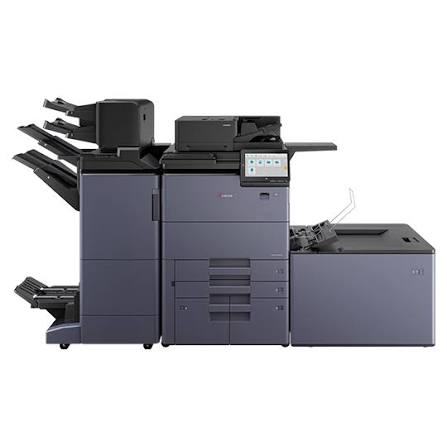
The Kyocera TASKalfa MZ9500ci is a powerful, high-performance A3 colour multifunction printer designed for businesses and organisations that require exceptional printing speed, professional-quality output and efficient document management. With impressive print speeds of up to 95 pages per minute in black and white and 80 pages per minute in colour, it is built to handle demanding, high-volume printing environments.
This advanced 3-in-1 multifunction printer combines printing, copying and scanning in one powerful device. It features a 10.1-inch colour touchscreen, HyPAS-ready technology, high-resolution output and fast one-pass duplex scanning of up to 300 images per minute. The supplied DF-7200 document finisher adds professional finishing capabilities, including 65-sheet stapling and three staple positions.
Configured with the UG-44 speed licence, the TASKalfa MZ9500ci is an excellent solution for organisations looking to improve productivity and streamline large-scale document workflows.
3. WHAT ARE THE MAIN SPECIFICATIONS?
-
Model: Kyocera TASKalfa MZ9500ci
-
Printer Type: A3 Colour Multifunction Printer
-
Functions: Print, Copy and Scan
-
Print Speed: 95 ppm Black & White / 80 ppm Colour
-
Print Resolution: Up to 2,400 × 2,400 dpi
-
Display: 10.1-inch Colour Touchscreen
-
Scanning Speed: Up to 300 ipm Duplex
-
Scanning System: One-Pass Duplex Document Processor
-
Connectivity and Workflow: HyPAS Ready
-
Speed Licence: UG-44
-
Finisher: DF-7200 Document Finisher
-
Stapling Capacity: Up to 65 Sheets
-
Stapling Positions: 3 Positions
-
Toner: Starter Toner Included
4. Specifications Table
| Feature | Specification |
|---|---|
| Brand | Kyocera |
| Model | TASKalfa MZ9500ci |
| Printer Type | A3 Colour MFP |
| Functions | Print, Copy, Scan |
| Print Speed | 95 ppm B&W / 80 ppm Colour |
| Resolution | Up to 2,400 × 2,400 dpi |
| Touchscreen | 10.1-inch Colour Panel |
| Duplex Scanning | Up to 300 ipm |
| Document Processor | One-Pass Duplex |
| Platform | HyPAS Ready |
| Speed Licence | UG-44 |
| Finisher | DF-7200 |
| Stapling | 65 Sheets, 3 Positions |
| Toner | Starter Toner Included |
5. WHAT IS THE KYOCERA TASKalfa MZ9500ci ABOUT?
The Kyocera TASKalfa MZ9500ci is a high-speed A3 colour multifunction printer developed for professional printing and document management. It allows users to print, copy and scan documents using one centralised machine.
Its high production speed makes it suitable for environments that process large volumes of reports, business documents, marketing materials, presentations and other office paperwork.
The printer also supports a wide range of paper sizes and media, making it a versatile choice for organisations with different printing requirements.
Kyocera Document Solutions India Pvt. Ltd.+1
6. IS THE KYOCERA TASKalfa MZ9500ci GOOD FOR DAILY USE?
Yes. The TASKalfa MZ9500ci is designed for demanding daily business operations where consistent performance and productivity are essential.
Its high-speed printing engine helps reduce waiting times, while its multifunction capabilities allow staff to print, copy and scan without relying on separate machines.
It is particularly suitable for organisations that handle continuous printing tasks and large document workloads.
7. HOW POWERFUL IS THE KYOCERA TASKalfa MZ9500ci?
The TASKalfa MZ9500ci delivers outstanding printing performance with speeds of up to 95 pages per minute in black and white and 80 pages per minute in colour.
Its high-resolution printing capability of up to 2,400 × 2,400 dpi produces sharp text, detailed graphics and professional-looking colour documents.
The UG-44 speed licence is included in this configuration to support the specified high-speed operating setup.
Kyocera Document Solutions America+1
8. CAN THE KYOCERA TASKalfa MZ9500ci HANDLE SCHOOL OR OFFICE WORK?
Absolutely. This printer is suitable for demanding office, educational and institutional environments.
It can handle large document workloads such as:
-
Business reports and financial statements.
-
School notes, examination papers and learning materials.
-
Corporate presentations and proposals.
-
Colour brochures and marketing documents.
-
Administrative records and bulk photocopying.
-
Large-format A3 documents and professional reports.
Its high-speed printing and scanning capabilities make it particularly useful where document turnaround time is important.
9. HOW IS THE PRINTING AND SCANNING PERFORMANCE?
The TASKalfa MZ9500ci is built for high-volume document production and fast digital document processing.
Printing Performance
-
Up to 95 pages per minute in black and white.
-
Up to 80 pages per minute in colour.
-
Up to 2,400 × 2,400 dpi print resolution.
-
Supports A3 and other compatible paper sizes.
-
Suitable for demanding professional printing workloads.
Scanning Performance
-
Up to 300 images per minute in duplex scanning.
-
One-pass duplex scanning for processing both sides of documents efficiently.
-
Suitable for digitising large volumes of paperwork.
-
Supports streamlined document management workflows.
These capabilities make the machine an excellent choice for organisations that need both fast printing and efficient document digitisation.
Kyocera Document Solutions America+1
10. IS THE KYOCERA TASKalfa MZ9500ci SUITABLE FOR BUSINESSES?
Yes. The TASKalfa MZ9500ci is designed for businesses and institutions with high-volume printing requirements.
It is suitable for:
-
Large corporate offices.
-
Government institutions.
-
Universities and colleges.
-
Commercial printing departments.
-
Financial and insurance organisations.
-
Hospitals and other large institutions.
-
Copy and document production centres.
Its combination of high-speed printing, colour output, copying, scanning and finishing capabilities helps organisations manage demanding document workflows more efficiently.
11. WHAT ADDITIONAL FEATURES DOES THE KYOCERA TASKalfa MZ9500ci OFFER?
10.1-Inch Colour Touchscreen
The large touchscreen provides an intuitive control interface, making it easier to access printing, copying, scanning and other device functions.
HyPAS-Ready Technology
Kyocera’s HyPAS platform supports compatible business applications and workflow solutions that can help improve document management and office productivity.
UG-44 Speed Licence
The supplied UG-44 speed licence forms part of this high-speed configuration.
DF-7200 Document Finisher
The included DF-7200 finisher provides professional document finishing with up to 65-sheet stapling and three staple positions.
One-Pass Duplex Scanning
The document processor scans both sides of documents efficiently, reaching speeds of up to 300 images per minute in duplex mode.
Starter Toner Included
The printer comes with starter toner to support initial operation. Actual toner yield depends on document coverage and usage conditions.
Kyocera Document Solutions India Pvt. Ltd.+2
12. WHO SHOULD BUY THE KYOCERA TASKalfa MZ9500ci?
The Kyocera TASKalfa MZ9500ci is ideal for organisations that require a powerful and reliable multifunction printer for continuous, high-volume document production.
It is particularly recommended for:
-
Businesses with large daily printing workloads.
-
Institutions handling bulk printing and photocopying.
-
Universities and educational establishments.
-
Government offices and public institutions.
-
Professional document production departments.
-
Organisations requiring fast colour printing and duplex scanning.
13. WHY CHOOSE THE KYOCERA TASKalfa MZ9500ci?
Choosing the Kyocera TASKalfa MZ9500ci means investing in high-speed printing, professional colour output and efficient document management.
Its key advantages include:
-
Exceptional printing speeds of up to 95 ppm black and white and 80 ppm colour.
-
High-quality output with up to 2,400 × 2,400 dpi resolution.
-
Convenient 3-in-1 printing, copying and scanning.
-
Fast one-pass duplex scanning of up to 300 ipm.
-
Large 10.1-inch colour touchscreen.
-
HyPAS-ready business workflow capabilities.
-
DF-7200 document finisher with 65-sheet stapling.
-
Suitable for demanding commercial and institutional environments.
14. KEY HIGHLIGHTS
-
Model: Kyocera TASKalfa MZ9500ci
-
Category: A3 Colour Multifunction Printer
-
Print Speed: 95 ppm Black & White / 80 ppm Colour
-
Functions: Print, Copy and Scan
-
Resolution: Up to 2,400 × 2,400 dpi
-
Display: 10.1-inch Colour Touchscreen
-
Scanning: Up to 300 ipm Duplex
-
Technology: HyPAS Ready
-
Licence: UG-44 Speed Licence
-
Finisher: DF-7200 Document Finisher
-
Stapling: 65 Sheets, 3 Positions
-
Toner: Starter Toner Included
15. FINAL THOUGHTS
The Kyocera TASKalfa MZ9500ci is a powerful A3 colour multifunction printer designed for organisations that demand speed, productivity and professional document quality. With its impressive 95 ppm black-and-white and 80 ppm colour printing speeds, high-resolution output, fast duplex scanning and professional DF-7200 finishing system, it is well equipped to handle demanding business printing environments.
Whether used in a large corporate office, government institution, university or commercial document centre, the TASKalfa MZ9500ci provides an advanced solution for high-volume printing, copying and scanning.
There are no reviews yet.